AI Meeting Recorder for Mac
AI-powered meeting recorder for Mac. Real-time transcription, speaker identification, and AI chat. All local, all private.
What is Nootle?
Nootle is a free, open-source AI meeting recorder designed exclusively for Mac. It sits quietly in your menu bar and automatically detects when you join a call on Zoom, Microsoft Teams, or Google Meet. Once recording begins, Nootle transcribes the conversation in real time with automatic speaker identification — so you always know who said what.
What sets Nootle apart from cloud-based alternatives is that all audio recording and transcription happens locally on your Mac. Your meeting recordings, transcripts, and notes never leave your computer. Transcription is powered by Parakeet, a state-of-the-art speech recognition model running via ONNX Runtime, delivering accurate results without requiring an internet connection for the core recording and transcription features. AI summaries and chat are only fully local if you point Nootle at Ollama — when you pick a cloud provider, transcript context is sent to that provider with your own API key.
After each meeting, Nootle generates AI-powered summaries, extracts action items, and lets you ask follow-up questions about anything discussed. You choose your AI provider — OpenAI, Anthropic, Google, Groq, OpenRouter, AWS Bedrock, or a fully local model via Ollama. Meeting insights can be automatically pushed to Slack, Notion, Linear, Confluence, GitHub, Asana, Obsidian, or email — and you can build custom templates and workflows so the right summary and the right follow-up actions run automatically for every meeting type.
Nootle is built for developers, product managers, and anyone who spends their day in meetings and wants to stay focused on the conversation instead of taking notes. It's MIT-licensed, actively maintained, and built by Michelle Mayes.
See it in action
Record meetings, get transcripts with speaker labels, then let AI surface what matters.
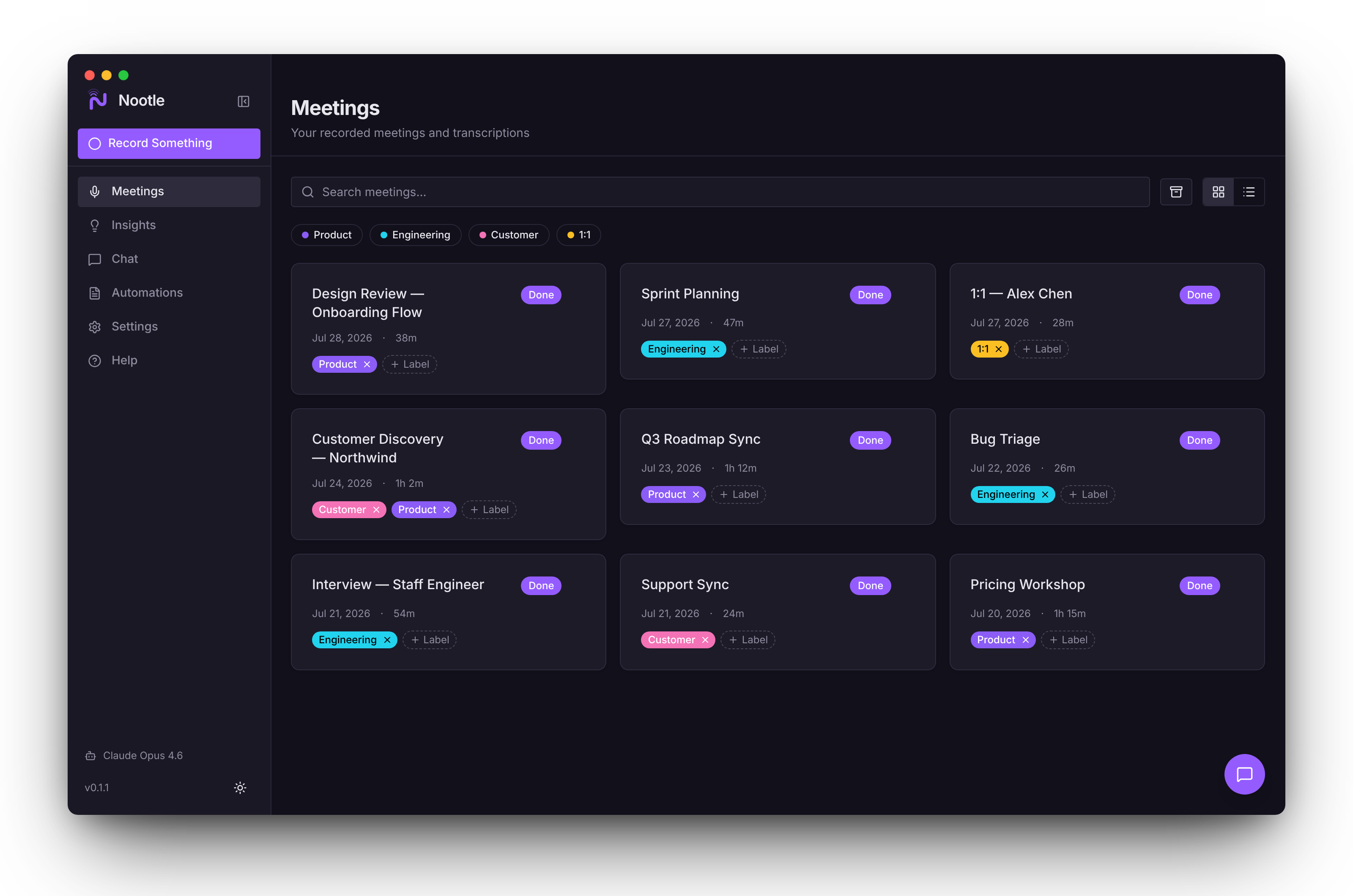
Every meeting in one library — searchable, labelled, and summarized.
Meeting recording features
Everything you need to capture, understand, and act on your meetings.
Local & Private
All audio recording and transcription happens entirely on your Mac using on-device machine learning. No meeting audio is ever sent to external servers, and transcripts and notes stay on your hardware. AI summaries and chat are only fully local if you choose Ollama as your provider — cloud providers (OpenAI, Anthropic, Google, Groq, OpenRouter, AWS Bedrock) receive transcript context when you invoke them.
Real-time Transcription
Live speech-to-text powered by Parakeet via ONNX Runtime, running locally on your Mac. Automatic speaker diarization identifies who said what, so you can follow conversations clearly. Captures both your microphone and system audio simultaneously for complete meeting coverage.
AI Summaries & Chat
Get instant AI-generated summaries after every meeting, highlighting key decisions and outcomes. Ask follow-up questions about anything discussed — Nootle lets you chat with your meeting transcript using your choice of AI provider: OpenAI, Anthropic, Google, Groq, OpenRouter, AWS Bedrock, or local models via Ollama.
Smart Insights
Automatically extract decisions, action items, and key moments from every meeting. Nootle identifies what was agreed upon, what needs to happen next, and who is responsible — so nothing falls through the cracks after a busy day of calls.
Search Across Meetings
Use AI-powered semantic search to ask questions across your entire meeting history. Instead of scrubbing through hours of recordings, just type a question like "What did we decide about the launch date?" and get the answer instantly with the relevant transcript context.
Noise Cancellation
Built-in noise reduction filters out background sounds for cleaner audio capture and more accurate transcriptions. Whether you're in a coffee shop, open office, or noisy home environment, Nootle produces clear, readable transcripts.
Auto-Detection
Nootle automatically detects when you join a meeting on Zoom, Microsoft Teams, or Google Meet and offers to start recording. No manual setup required — just join your call and Nootle handles the rest, so you never miss an important conversation.
Workflows & Integrations
Push meeting notes and action items to the tools you already use. Build workflows that send summaries to Slack, create Linear, GitHub, or Asana tickets, update Notion or Confluence pages, save Markdown to Obsidian, or email a recap — with one click or fully automated per template.
Customizable Templates
Tailor summaries to how you actually work. Create templates with custom sections and prompts for standups, 1:1s, interviews, or sales calls, and use auto-apply rules so the right template runs automatically based on meeting context.
CLI & Developer Tools
Query your meetings from the terminal with Nootle's built-in CLI. An MCP server enables AI assistant integration, letting tools like Claude or GPT access your meeting data for deeper analysis and automated workflows.
Why choose Nootle over cloud alternatives?
Unlike Otter.ai, Fireflies.ai, and other cloud-based meeting recorders, Nootle keeps your data local and your costs at zero.
Privacy by design
Cloud recorders like Otter.ai and Fireflies.ai upload your meeting audio to their servers for processing. Nootle records and transcribes entirely on your Mac — meeting audio never leaves your hardware. AI summaries and chat use the provider you choose; pick Ollama with a local model to keep transcript context on-device too, or use OpenAI / Anthropic / Google / Groq / OpenRouter / AWS Bedrock with your own API key.
Works offline
Because transcription runs locally via ONNX Runtime, Nootle's core recording and transcription features work without an internet connection. Cloud-based tools require a stable connection throughout your entire meeting, and will fail or produce gaps if your connection drops.
Free and open source
Most AI meeting recorders charge $15–30 per month for transcription and summaries. Nootle is completely free under the MIT license. You only pay for AI provider API usage if you choose to use cloud-based summarization — and you can avoid even that by using Ollama with a local model.
Developer-friendly
Nootle includes a CLI for querying meetings from the terminal and an MCP server that lets AI assistants like Claude access your meeting data. The entire codebase is open source on GitHub, so you can extend, customize, or self-audit every aspect of how your data is handled.
Integrations
Meeting app integrations
Auto-detects meetings and pushes notes to the tools you already use.
How Nootle works
Join your meeting
Nootle runs quietly in your menu bar and automatically detects when you join a call on Zoom, Microsoft Teams, Google Meet, or other conferencing apps. It prompts you to start recording — no manual setup or browser extensions needed.
Record & transcribe
Audio is captured from both your microphone and system output, then transcribed in real time using on-device machine learning. Speaker diarization labels each segment so you can see exactly who said what throughout the conversation.
Review & chat
After the meeting, browse the full transcript with speaker labels and timestamps. Get an AI-generated summary of key points, decisions, and action items. Ask follow-up questions about anything discussed — Nootle's AI chat lets you query the transcript conversationally.
Run workflows
Automatically push meeting notes and action items to the tools your team uses. Send summaries to Slack channels, create Linear or Asana tickets, update Notion or Confluence pages, or email a recap to attendees — all with a single click or fully automated.
System requirements
Operating System
macOS 14 (Sonoma) or later
Processor
Apple Silicon (M1, M2, M3, M4)
Storage
200 MB for app, plus space for recordings
Permissions
Microphone and Screen Recording access
Frequently asked questions
Everything you need to know about Nootle.
Yes. Nootle is completely free and open source under the MIT license. You can download it from GitHub, inspect the source code, and contribute to development. If Nootle saves you time, you can optionally support development through GitHub Sponsors.
Recording and transcription are always local — meeting audio is never uploaded, and transcripts are stored only on your Mac. AI summaries and chat use whichever provider you choose: pick Ollama to keep everything on-device, or OpenAI, Anthropic, Google, Groq, OpenRouter, or AWS Bedrock to send transcript context to that provider with your own API key. Nootle is fully local end-to-end only when you use a local AI model.
Nootle auto-detects meetings on Zoom, Microsoft Teams, and Google Meet. It captures both your microphone input and system audio output, so it works with any conferencing app that plays audio through your Mac's speakers or headphones.
Nootle requires macOS 14 (Sonoma) or later on Apple Silicon (M1, M2, M3, M4). Intel Macs are not supported. The app requires Microphone and Screen Recording permissions to capture meeting audio.
After a meeting is transcribed, you can ask questions about the conversation in natural language. Nootle sends the transcript context to your chosen AI provider — OpenAI, Anthropic, Google, Groq, OpenRouter, AWS Bedrock, or a local model via Ollama — using your own API key. The transcript itself stays on your Mac; only the relevant context is sent when you ask a question.
Nootle integrates with Slack, Notion, Confluence, GitHub, Linear, Asana, Obsidian, and email. After a meeting, you can automatically push summaries, action items, and notes to any connected tool. You can also use the CLI or MCP server to build custom workflows.
Nootle uses Parakeet, a state-of-the-art speech recognition model running via ONNX Runtime. Accuracy depends on audio quality, but built-in noise cancellation helps produce clear transcripts even in noisy environments. Speaker diarization automatically identifies different speakers in the conversation.
Yes. Nootle includes AI-powered semantic search that lets you query your entire meeting history. Instead of scrolling through transcripts, ask a question like "What did we decide about the Q2 roadmap?" and Nootle finds the relevant passages across all your recorded meetings.
Support Nootle
Nootle is free and open source. If it saves you time, consider supporting development.
Sponsor on GitHub