AI Meeting Recorder for Mac
Record any call without a bot, transcribe it on your Mac, and get summaries, action items, and answers from your meetings and docs, even live mid-call. Free and open source.
brew tap michellemayes/nootle https://github.com/michellemayes/nootle && brew install --cask nootlemacOS 14+ on Apple Silicon · MIT licensed · No account, no telemetry
- of meeting audio uploaded. Ever.
- 0 MB
- a month, instead of a subscription
- $0
- ways to plug in your AI, local models included
- 9
- call apps detected, no bot required
- 7
What is Nootle?
Nootle is a free, open-source AI meeting recorder for Mac users who spend their day on calls. It records and transcribes meetings on your Mac without a bot joining, then writes summaries, pulls out action items, and answers questions from your meetings and documents. It runs in the background and offers to record when a call starts on Zoom, Microsoft Teams, Webex, Slack, FaceTime, Discord, or Google Meet in your browser. Once recording begins, Nootle transcribes the conversation in real time with automatic speaker identification — so you always know who said what — and it can learn voices so people are named for you in later meetings.
What sets Nootle apart from cloud-based alternatives is that all audio recording and transcription happens locally on your Mac. Your meeting recordings, transcripts, and notes never leave your computer. Transcription is powered by Parakeet, a state-of-the-art speech recognition model running via ONNX Runtime, delivering accurate results without requiring an internet connection for the core recording and transcription features. AI summaries and chat are only fully local if you point Nootle at Ollama — when you pick a cloud provider, transcript context is sent to that provider with your own API key or your Claude or ChatGPT subscription. Local-only mode makes sure only local models ever see meeting content.
Point Nootle at your project folders, documents, and web pages and it indexes them on your Mac, so chat can answer from your meetings and your docs together. During a call, Live Assist uses the same knowledge base to answer questions as they come up. After each meeting, Nootle generates AI-powered summaries, expands your shorthand notes, extracts action items, and lets you ask follow-up questions about anything discussed. You choose your AI provider — OpenAI, Anthropic, Google, Groq, OpenRouter, AWS Bedrock, a fully local model via Ollama, or the Claude Code and Codex CLIs. Meeting insights can be automatically pushed to Slack, Notion, Linear, Confluence, GitHub, Asana, Obsidian, or email — and you can build custom templates and workflows so the right summary and the right follow-up actions run automatically for every meeting type.
Nootle is built for developers, product managers, and anyone who spends their day in meetings and wants to stay focused on the conversation instead of taking notes. It's MIT-licensed, actively maintained, and built by Michelle Mayes.
See it in action
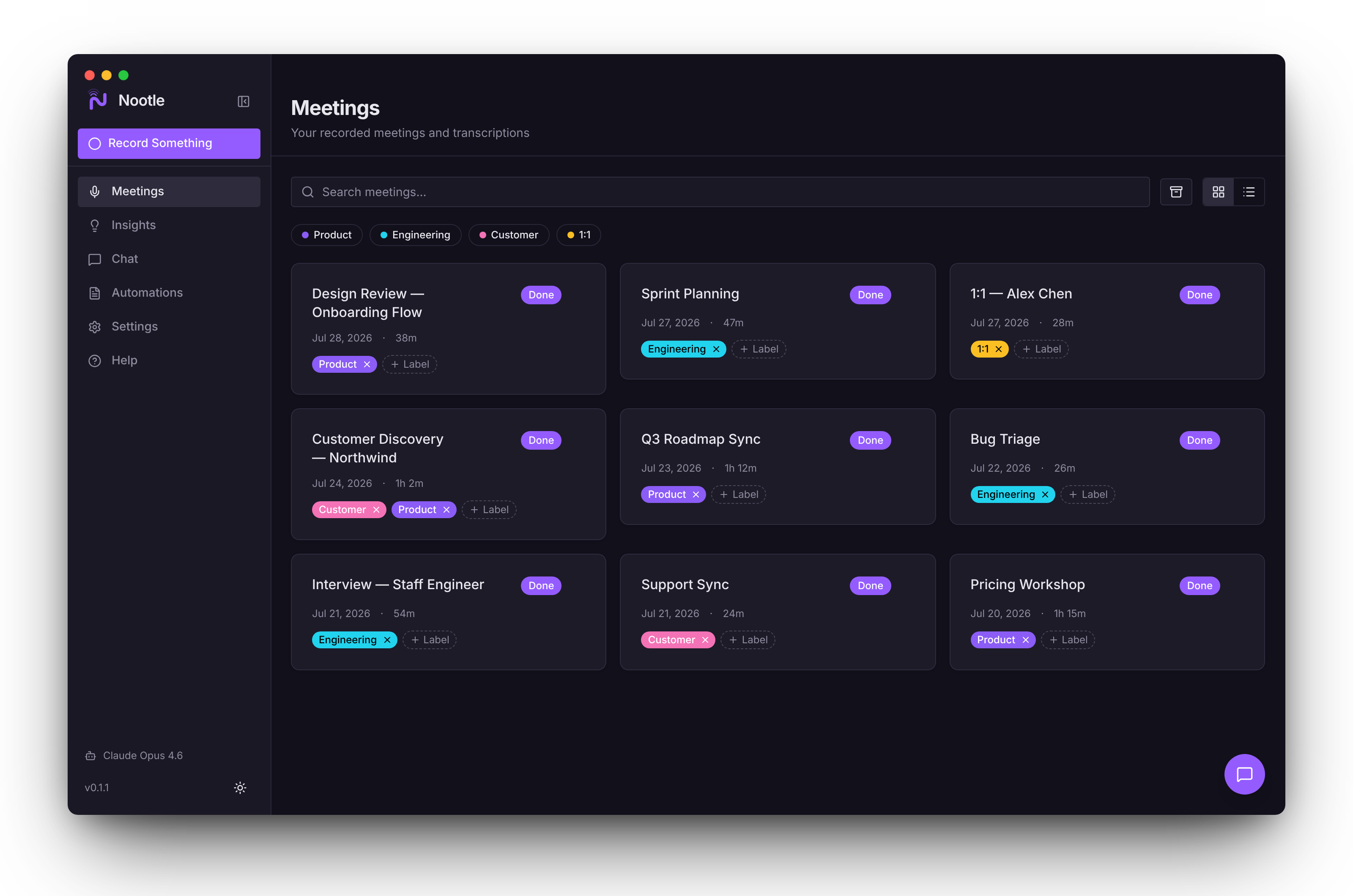
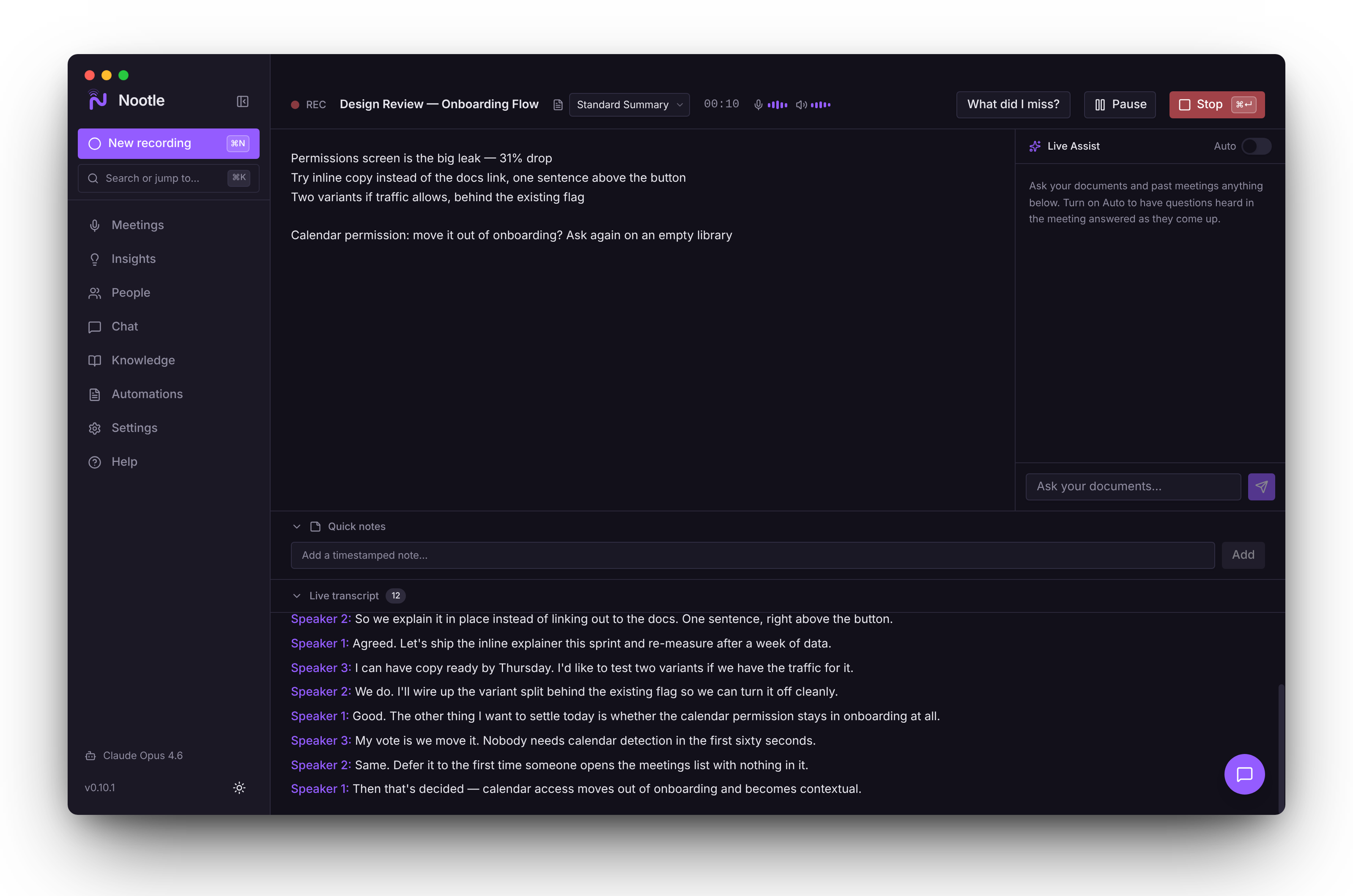
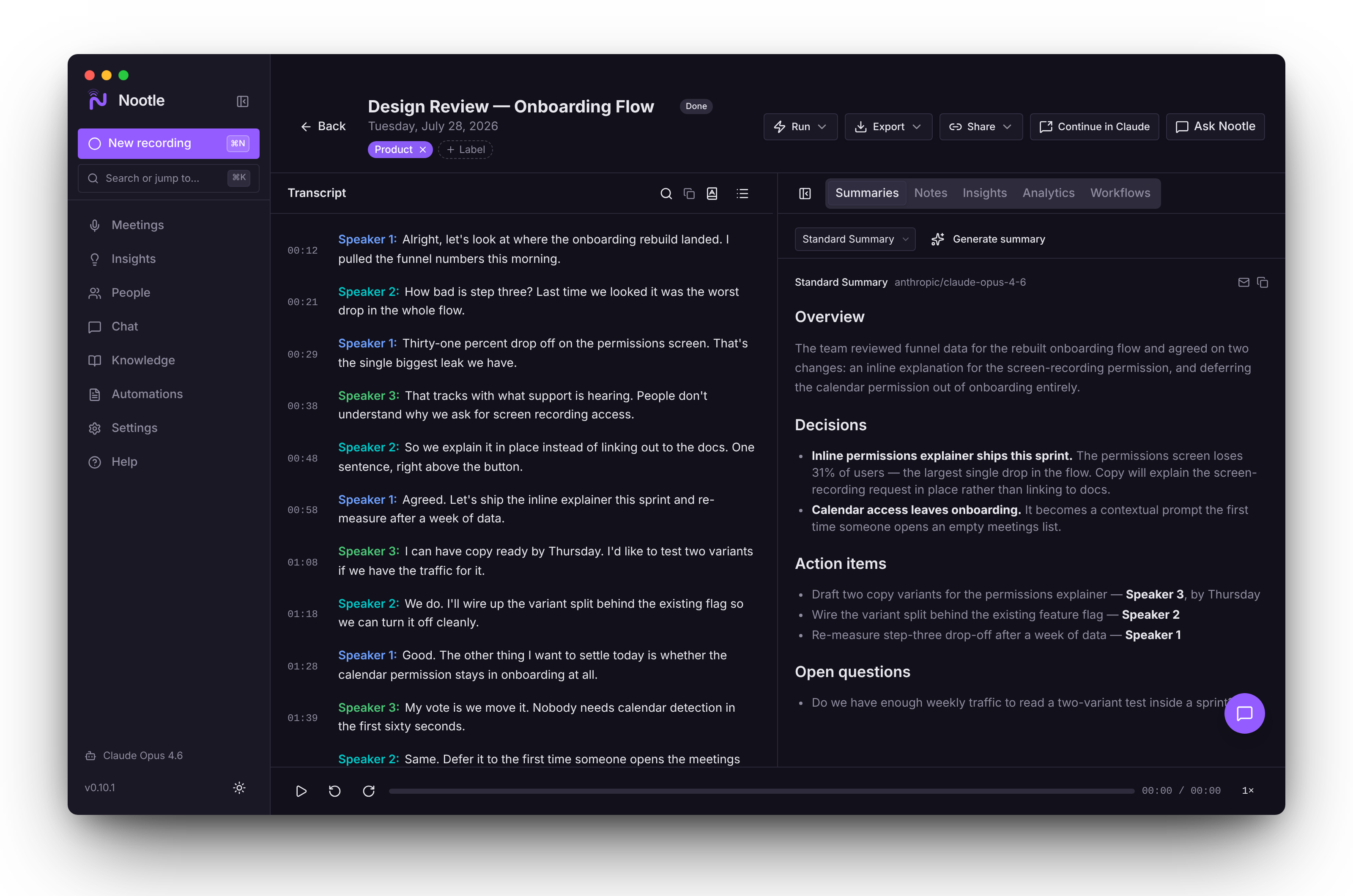
Record meetings, get transcripts with speaker labels, then let AI surface what matters.
Meeting recording features
Everything you need to capture, understand, and act on your meetings, and now your docs too.
Live Assist answers mid-callNew
While you record, a side panel listens for questions your documents or past meetings can answer and shows a short reply you could say aloud, with its sources. Type your own question any time. Small talk is ignored, and it stays quiet when nothing relevant turns up.
Local by default
Recording and transcription always run on your Mac, and audio is never uploaded. Turn on Local-only mode and only local models can see meeting content. No telemetry, ever.
A knowledge base of your docsNew
Add project folders, files, and web pages: PDF, Word, PowerPoint, Excel, Markdown, and more. Nootle indexes them on your Mac and answers from them alongside your meetings, citing the page or slide.
Speakers it remembers
Every voice is told apart, and names are read from the call's video tiles. Turn on Remember voices and people you've named are recognised in later meetings, on any app or in person.
Snapshots of shared screens
When someone shares slides, designs, or charts, Nootle snaps one picture per slide into your notes and reads the text on your Mac, so you can ask what the revenue chart said.
Shorthand in, full notes outNew
Jot terse notes while you talk. When the call ends, Nootle expands them from the transcript, the calendar agenda, and your knowledge base. Your originals stay one click away.
Any AI, including the one you pay for
Use OpenAI, Anthropic, Google, Groq, OpenRouter, or AWS Bedrock with your own key, local models through Ollama, or your existing Claude or ChatGPT subscription through the Claude Code and Codex CLIs.
And everything around the call
Capture
Meeting detection. A pop-up offers to record when a call starts on Zoom, Teams, Webex, Slack, FaceTime, Discord, or in the browser.
Calendar up next. One-click Record and Join, recordings named after the event, and what's still open from last time.
Live audio levels. Mic and call meters, plus a warning if Nootle hears nothing for 20 seconds.
Pause and resume. Go off the record mid-meeting. Nothing is captured while paused.
Crash-safe recording. Saved every few seconds and recovered on next launch if anything quits.
Import anything. Audio and video files, or transcripts from Otter, Fathom, Granola, Zoom, Teams, and Meet.
Understand
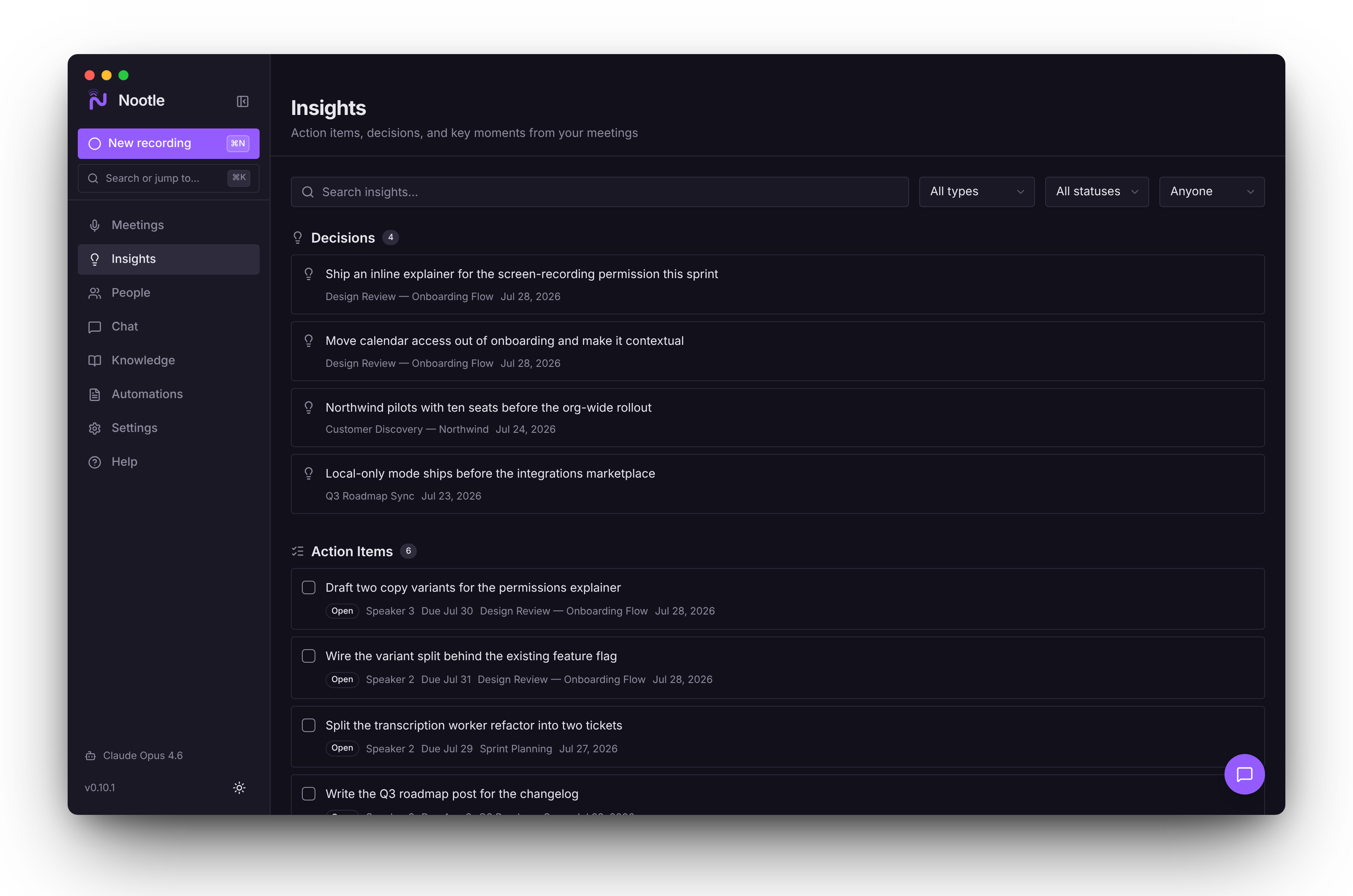
Summaries and insights. Decisions, action items with owners, and key moments from every meeting.
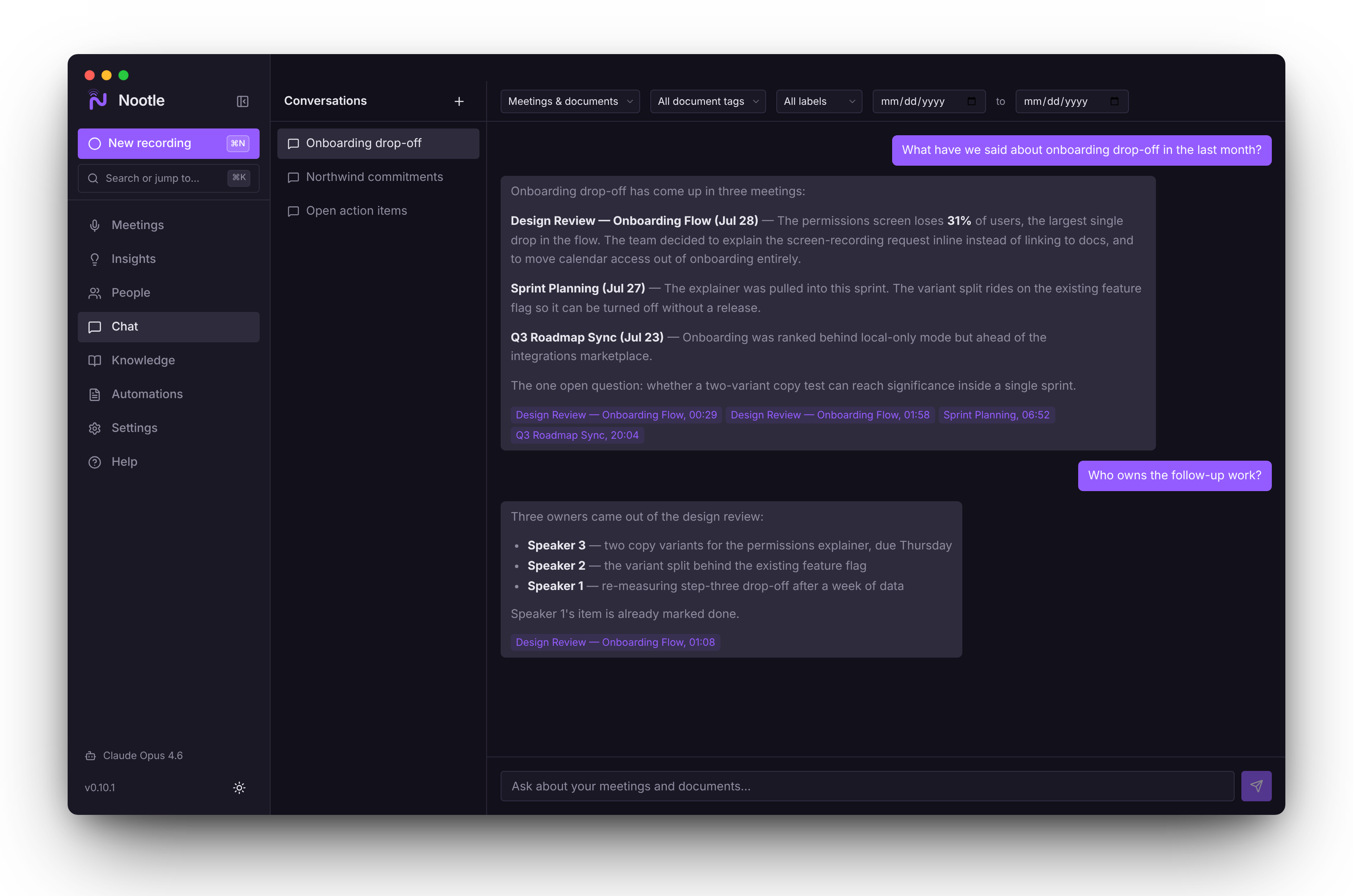
Ask across everything. Chat with every meeting and document at once, with citations you can click.
What did I miss?. One click recaps the last five minutes and anything asked of you.
People. Everyone you meet, how often, and the action items they own.
A dictionary that learns. Fix a misheard name once and it's right in every future meeting.
Synced playback. Click any line or timestamp to hear that moment, at up to 2× speed.
Act and own
Workflows. Send summaries and tasks to Slack, Notion, Confluence, Linear, GitHub, Asana, Obsidian, or email.
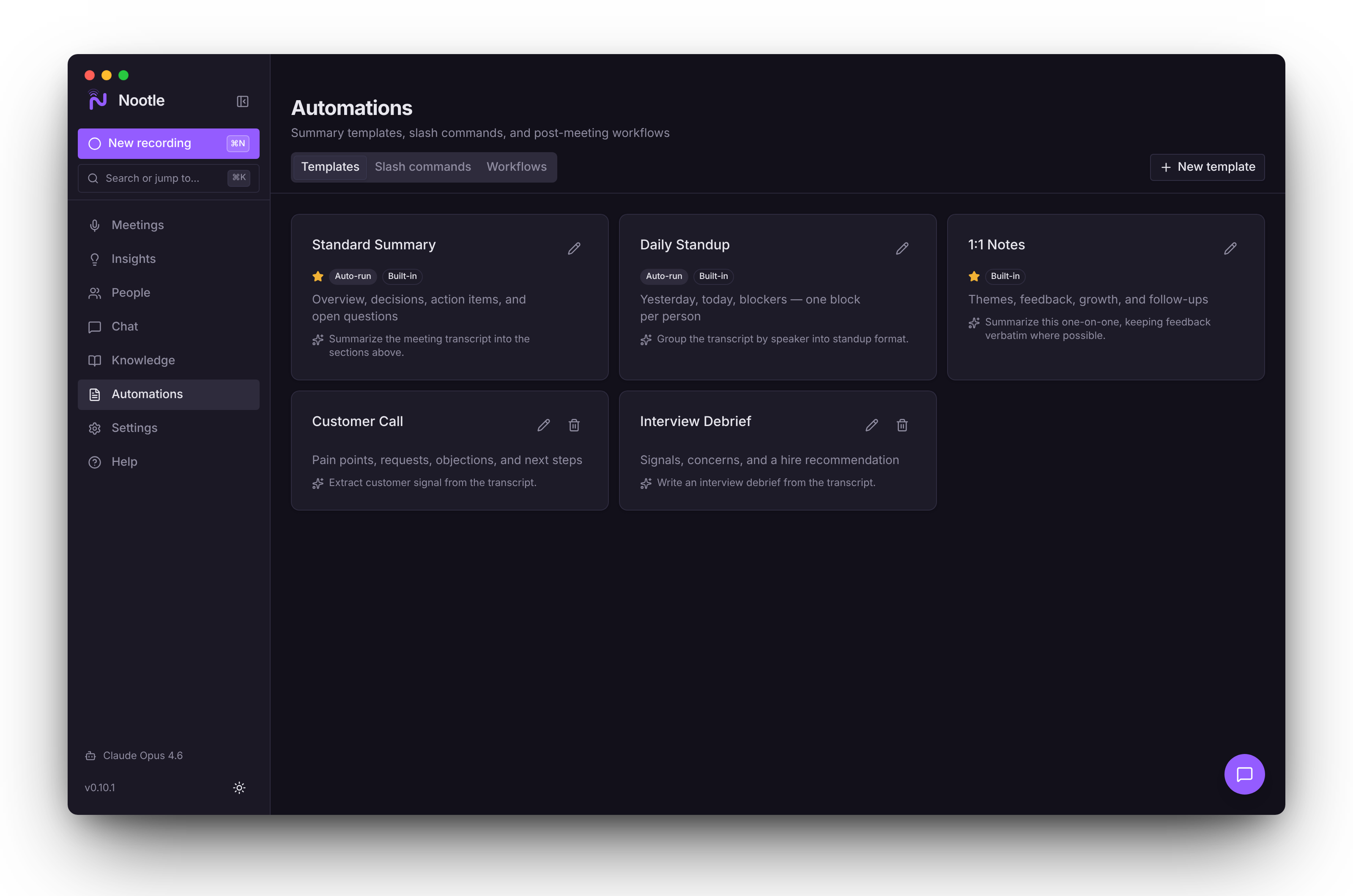
Templates. Summary formats for 1:1s, standups, or interviews that run on their own.
MCP server and CLI. Let Claude Code and other agents read meetings and set up automations.
Private share links. Share a meeting's notes with a link. They're end-to-end encrypted on your Mac, so only people with the link can read them, not even nootle.ai.
Plain files you own. Export one meeting or all of them as Markdown, text, SRT, or WebVTT.
Keyboard-first. ⌘K command palette, ⌘N to record from anywhere, and ? for every shortcut.
Updates in one click. New versions install themselves, never in the middle of a recording.
How Nootle compares
Cloud recorders like Otter.ai and Fireflies.ai upload your audio to their servers. Nootle records and transcribes on your Mac, works offline for capture, and costs nothing.
| Feature | Nootle | Granola | Otter | Meetily |
|---|---|---|---|---|
| Records without a bot joining the call | Yes | Yes | Desktop app only | Yes |
| Transcription on your Mac | Yes | No | No | Yes |
| Tells speakers apart, remembers names | YesFree | “Me / Them” on desktop | Yes | Pro |
| Any AI, including local models or your Claude / ChatGPT subscription | Yes | No | No | Yes |
| Full history as plain files you own | Yes | Limited free history; encrypted local cache | Paid plans | Yes |
| Answers from your own docs, live in the call | Yes | No | No | No |
| MCP server and CLI for agents | YesRead-only mode available | MCP on paid plans | MCP (enterprise) | — |
| Open source | YesMIT | No | No | Open core |
| Price | Free | Free / $14 a month | Free / from $8.33 a month | Free / about $10 a month |
Competitor details are as of October 2026 and change often; check their sites.
Integrations
Meeting app integrations
Works with whatever your call runs on, the AI you already use, and the tools your notes belong in.
Records calls on
- Zoom
- Microsoft Teams
- Google Meet
- Webex
- Slack huddles
- FaceTime
- Discord
- Browser calls
Thinks with
- Ollama
- Claude Code
- Codex CLI
- OpenAI
- Anthropic
- Google Gemini
- Groq
- OpenRouter
- AWS Bedrock
Sends notes to
- Slack
- Notion
- Confluence
- Linear
- GitHub
- Asana
- Obsidian
How Nootle works
- 01
Join your call
Turn on Auto-detect meetings and a small pop-up offers to record when a call starts on Zoom, Teams, Webex, Slack, FaceTime, Discord, or a browser call like Google Meet, even with Nootle's window closed. Or hit Record on the event in Up next, or press ⌘N from anywhere.
- 02
Record and transcribe
Your microphone and the call's audio are transcribed on your Mac as people talk. Speakers are told apart and, once you've named them, recognised by voice next time. Jot shorthand notes as you go; they save as you type.
- 03
Get help in the moment
Live Assist answers questions from your documents and past meetings while the call is still going. Zoned out? “What did I miss?” recaps the last five minutes and anything asked of you.
- 04
Review and ask
When the call ends, Nootle summarizes it, expands your notes, and pulls out decisions and action items with owners. Ask anything across every meeting and document, with citations that jump to the moment.
- 05
Send it where it belongs
Workflows post summaries to Slack, file Linear, GitHub, or Asana tickets, update Notion or Confluence, save Markdown to Obsidian, or email a recap. Run them with one click or on every meeting.
System requirements
Operating System
macOS 14 (Sonoma) or later
Processor
Apple Silicon (M1, M2, M3, M4, M5)
Storage
200 MB for the app, plus space for models and recordings
Permissions
Microphone and Screen Recording (Calendar optional)
Frequently asked questions
Everything you need to know about Nootle.
Yes. Nootle is completely free and open source under the MIT license. You can download it from GitHub, inspect the source code, and contribute to development. If Nootle saves you time, you can optionally support development through GitHub Sponsors.
Recording and transcription are always local — meeting audio is never uploaded, and transcripts are stored only on your Mac. AI summaries and chat use whichever provider you choose: pick Ollama to keep everything on-device, or OpenAI, Anthropic, Google, Groq, OpenRouter, or AWS Bedrock to send transcript context to that provider with your own API key. Nootle is fully local end-to-end only when you use a local AI model. Turn on Local-only mode (Settings → Privacy) to enforce that.
No. Nootle records your microphone and your Mac's system audio directly, so nobody sees an extra participant. Because of that, a consent reminder offers a message you can paste into the meeting chat when a recording starts.
Nootle records any call that plays audio through your Mac. With Auto-detect meetings on, a small pop-up offers to record when a call starts on Zoom, Microsoft Teams, Webex, Slack, FaceTime, Discord, or a browser call like Google Meet. You can also import audio and video files, or transcripts exported from Otter, Fathom, Granola, Zoom, Teams, or Meet.
Yes. Nootle can route summaries and chat through the Claude Code CLI (claude -p) or the Codex CLI, reusing a Claude or ChatGPT subscription you already have. You can also use an API key for OpenAI, Anthropic, Google, Groq, OpenRouter, or AWS Bedrock, or a local model through Ollama.
Yes. On the Knowledge page, add project folders, files, and web pages (PDF, Word, PowerPoint, Excel, Markdown, plain text, CSV, and HTML). Nootle reads and indexes them on your Mac; the files never leave it. Chat then answers from your meetings and documents together, citing the page, slide, or sheet. During a call, Live Assist uses the same knowledge base to answer questions as they come up.
After a meeting is transcribed, you can ask questions about it, or across every meeting and document, in plain language. Nootle finds the relevant passages on your Mac and sends only those to your chosen AI provider. Answers cite the meeting moments and document pages they came from, and you can click a citation to jump there.
Nootle requires macOS 14 (Sonoma) or later on Apple Silicon (M1, M2, M3, M4, or M5). Intel Macs are not supported. The app needs Microphone and Screen Recording permissions to capture meeting audio; Calendar access is optional.
Nootle integrates with Slack, Notion, Confluence, GitHub, Linear, Asana, Obsidian, and email. Notion, Linear, and Confluence connect in one click through their official MCP servers, and GitHub can reuse your GitHub CLI sign-in. After a meeting, workflows push summaries, action items, and notes to any connected tool. You can also use the CLI or MCP server to build custom workflows.
Nootle uses Parakeet, a state-of-the-art speech recognition model running via ONNX Runtime, or Underdog Bark 3.0 Plus, a smaller English-only version of it that's as accurate. Nootle splits audio where people pause, so whole sentences are transcribed together, and after each meeting it compares every speaker's voice across the whole recording to tell people apart. Fix a misheard name once and the dictionary applies it to every future meeting. Accuracy depends on audio quality.
Yes. Nootle combines meaning-based search with keyword search across your entire meeting history and knowledge base. Ask a question like "What did we decide about the Q2 roadmap?" or search for a ticket number or a customer's name, and Nootle finds the relevant passages.
Anyone you give the link to, and no one else. Share links are end-to-end encrypted: Nootle encrypts the notes on your Mac with a key of their own, uploads only the encrypted copy, and puts the key in the link after the #, a part browsers never send to a server. So nootle.ai stores nothing it can read. The transcript is left out unless you include it, and Stop sharing, or deleting the meeting, deletes the shared copy. Sharing is off in Local-only mode.
No. The Nootle app sends no analytics, crash reports, or usage data anywhere. Its only network calls are the AI provider you pick, model downloads from Hugging Face, integrations you set up, share links you create (end-to-end encrypted), web pages you add to your knowledge base, and the update check against GitHub Releases.
Support Nootle
Nootle is free and open source. If it saves you time, consider supporting development.
Sponsor on GitHub